Demand analysis
What customers search for, what they search for in vain, and where to open a new store first.
The Demand group mines customer search behaviour on the public map. It is the only signal telling you what customers want that you do not have — something the interaction reports cannot say.
Search
This report gathers every search signal in one place.
Unmet demand summary
Three numbers at the top:
- Total searches in the period.
- Empty searches — searches that returned nothing.
- Areas worth opening a store in — areas with searches but no store.
Rising empty searches is a bad sign
Unlike the other metrics, more empty searches is not what you want: customers had a need and left empty-handed.
Two things to know before drawing conclusions from that number:
- When a customer has an area filter on, search only runs inside that area. Typing the name of a store in another province returns nothing — by design, because they are looking at this province. So part of your "empty searches" is not missing stores, it is customers searching outside the area they are viewing.
- Search runs on the fields you show customers in the list. That is deliberate: a returned result always shows visibly why it matched. If customers commonly call a store by a name you store but do not display, consider adding that field to the list — rather than exposing every field, because a result matching on something the customer cannot see is more confusing than no result at all.
Subtract those two effects and what remains is the signal of a genuine gap in coverage — which the Demand by area table below helps you locate.
Top keywords
The keywords customers search most, with their change against the previous period. A sharply rising keyword shows demand shifting; check it against your existing data to see whether you already serve it.
Demand by area
A table sorted by searches, descending. Each row shows searches, empty searches, the number of existing stores and a verdict (Open a store here / Review coverage / Covered). The columns mean exactly the same as the Demand vs. Stores mode in Area analysis.
The table only lists areas with at least one search in the period; areas nobody searched do not appear.
Expansion
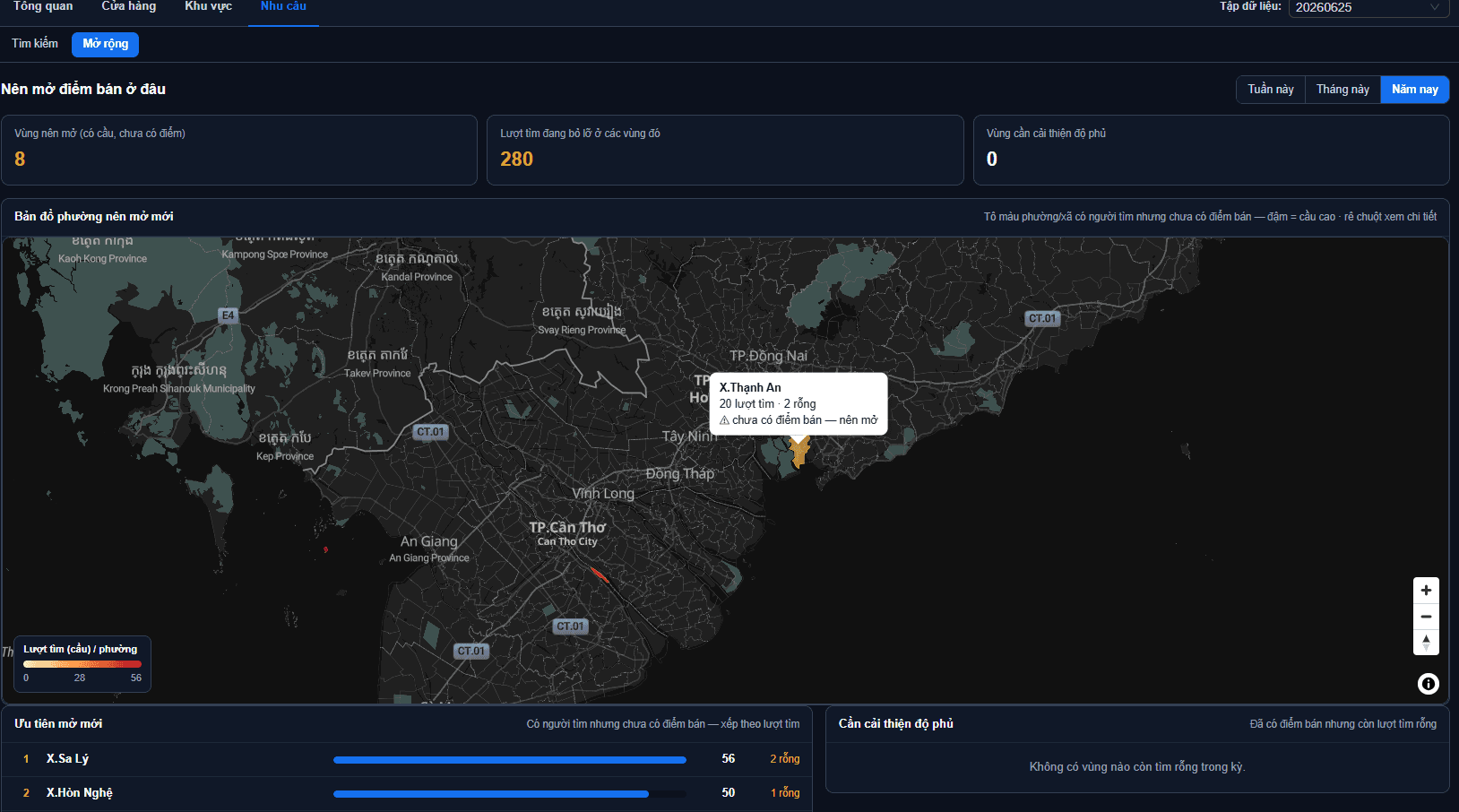
The "Where should I open next" page turns search signal into a list of actions.
New-store opportunities
Keeps only areas with customer searches but no store at all, sorted by searches descending — the biggest opportunity sits at the top. The total at the head of the page tells you how many searches you are currently missing across those areas.
This page works at ward level
Province level says almost nothing about "where should I open", since few provinces have no store at all. So the page always analyses at ward level, matching the map below it.
Coverage to improve
A secondary group: areas that already have stores but where customers still find nothing, sorted by empty searches. These usually do not need another store — they need a review of the existing stores' information: names, addresses, and the fields that feed search.
The opportunity map
The accompanying map plots the listed areas by position, so you can spot opportunity areas that sit next to each other — often one well-placed store covers the whole cluster.
Read it alongside real-world costs
This list ranks purely by search demand. It knows nothing about rent, competitors or your operational capacity. Treat it as a shortlist to go and survey, not as a final decision.
When the report is empty
The Demand group only has numbers when customers actually type into the search box on your public map. Three common reasons for an empty report:
- The map was just published, or has few viewers — not enough activity yet.
- Customers view but do not search. Only typing is recorded; opening the page, panning, zooming or clicking a store do not count towards this group.
- The embed has the list panel switched off. The search box lives inside the store list panel next to the map — turn that off and customers have nowhere to type. See Embedding into a website to check.
Next: What the metrics mean — a quick reference for every figure.